
Core workflow
PDF reflow
Convert fixed pages into flexible text that fits narrow screens.
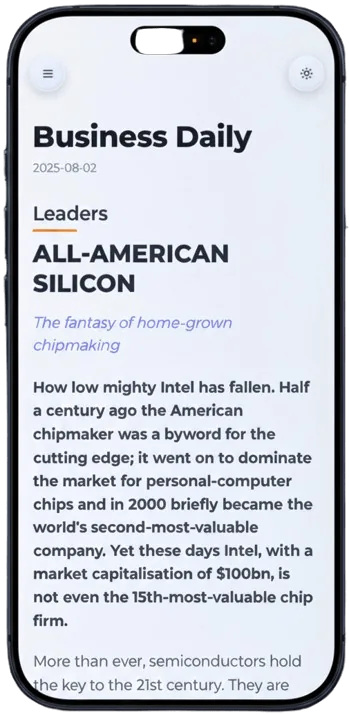
Reflow fixed PDF pages into a mobile reading view that behaves like a clean article. PDF2Mobile keeps the reading order, headings, paragraphs, and useful structure so long documents are easier to read on phones, tablets, and desktop browsers.
Core workflow
PDF reflow
Convert fixed pages into flexible text that fits narrow screens.
Reader problem
No side scroll
The output is built for vertical reading instead of dragging around a shrunken page.
Input coverage
Text + scans
Use it for normal PDFs and scanned PDFs that need OCR before reflow.
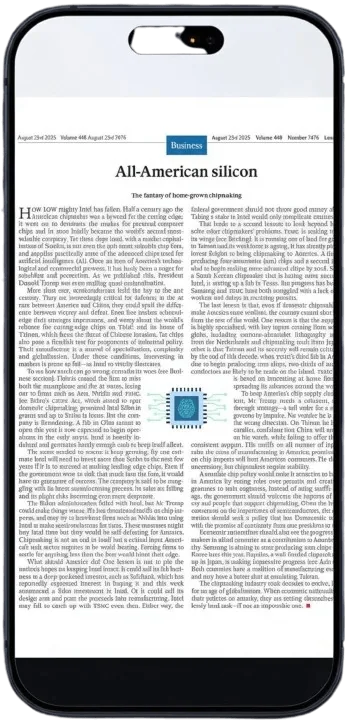
A desktop PDF page shrinks to fit the phone screen. Multi-column text, wide margins, headers, footers, and tiny captions force pinch zoom on every page.
Turn long fixed-layout business documents into a format that can be read away from a desktop.
Make instructions easier to follow on a phone while keeping headings and ordered steps intact.
Run OCR first, then convert recognized text into a cleaner mobile reading flow.
We don't just extract text; we preserve the logical flow and structure of your document.
Images are resized and placed correctly within the reflowed text.
Works on desktop, tablet, and mobile. Read anywhere.
Upload any standard PDF document.
We analyze the layout and reflow the content.
See your document in a new, responsive light.
PDF reflow converts fixed-layout pages into flexible text that wraps to the width of your screen. Instead of zooming around a page, you read a continuous article with headings, paragraphs, lists, and images resized for the viewport.
Use PDF reflow for manuals, ebooks, reports, research papers, legal PDFs, and scanned documents that are hard to read on a phone. It is designed for comfortable reading first, not just raw text extraction.
PDF reflow converts a fixed PDF page into flexible text that wraps to the width of your screen. It is useful when a PDF is technically openable but painful to read on a phone.
Yes. Plain extraction often dumps text. PDF2Mobile aims to preserve reading order, headings, lists, captions, and useful structure.
Yes. Scanned PDFs are handled with OCR first, then the recognized text is converted into a readable view.
Convert PDF to a mobile view for easier phone reading. Reflow fixed pages into clean, scrollable text for iPhone, Android, tablet, and desktop.
Use an Adobe Liquid Mode alternative online to reflow PDFs into readable mobile views. No Acrobat install, no Creative Cloud required.
Read PDFs on Android without constant zooming. Convert fixed PDF pages into mobile-friendly text that fits Chrome, Samsung Internet, Pixel, and Galaxy screens.