
Search intent
Mobile view
Users are searching for a converted reading view, not just another PDF viewer.
Stop pinching and zooming. Convert standard PDFs into responsive, mobile-friendly articles that look great on phones. PDF2Mobile reflows text to fit your screen and keeps documents comfortable to read.
Search intent
Mobile view
Users are searching for a converted reading view, not just another PDF viewer.
Device fit
iOS + Android
The converted article adapts to phone and tablet screens in the browser.
Library
Reopen later
Saved conversions make repeat reading easier than hunting for the original file.
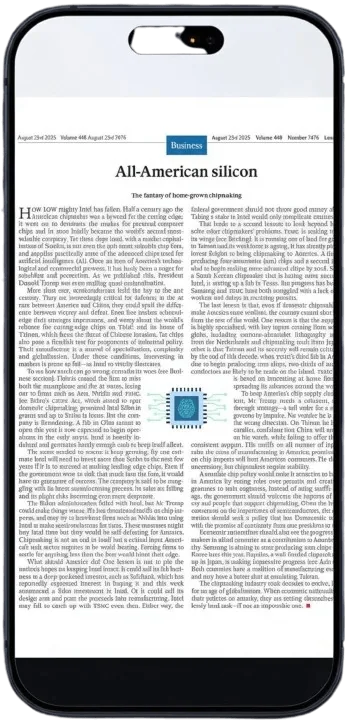
A fixed PDF page uses print layout. It may have two columns, small type, footers, and wide margins that do not fit a narrow screen.
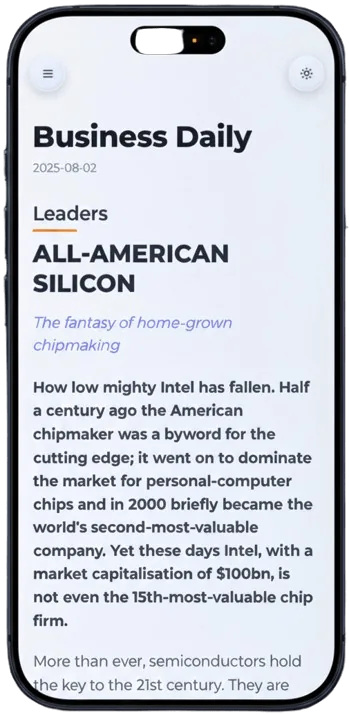
Text resizes to fit your phone screen. No more horizontal scrolling.
Converted articles support dark mode automatically, saving your battery and eyes.
Save the converted article to read later without an internet connection.
Upload the PDF you want to read on your phone.
We extract the content and restructure it for vertical scrolling.
Open the link on your phone and enjoy a native reading experience.
A normal PDF viewer keeps the original page size, which makes text tiny on phones. PDF2Mobile creates a mobile PDF view with readable text, vertical scroll, and a clean article layout.
Use this when you search for a PDF to mobile converter, mobile PDF reader, or mobile-friendly PDF tool. The goal is not only to open the file, but to make the document readable.
The output works in any web browser, including on Kindle Fire tablets.
We do our best to preserve tables, but complex layouts might be simplified for readability.
Reflow PDF pages online into readable, phone-width text. Convert fixed PDFs into mobile-friendly articles with headings, lists, OCR, and no horizontal scrolling.
Read PDFs on Android without constant zooming. Convert fixed PDF pages into mobile-friendly text that fits Chrome, Samsung Internet, Pixel, and Galaxy screens.
Read PDFs on iPhone without pinching or horizontal scrolling. Convert fixed PDF pages into mobile-friendly articles that fit Safari, iCloud files, and small screens.