
Reader problem
Tiny text
Fix PDFs that technically open on a phone but are too small to read.
Use this page when your main problem is constant pinch zoom. PDF2Mobile converts the fixed PDF page into a responsive reading view, so text wraps to your screen instead of forcing you to pan around a print layout.
Reader problem
Tiny text
Fix PDFs that technically open on a phone but are too small to read.
Output
Article view
Read with vertical scrolling instead of page-by-page zooming.
Best for
Long PDFs
Useful when repeated zooming makes a report, manual, or paper hard to finish.
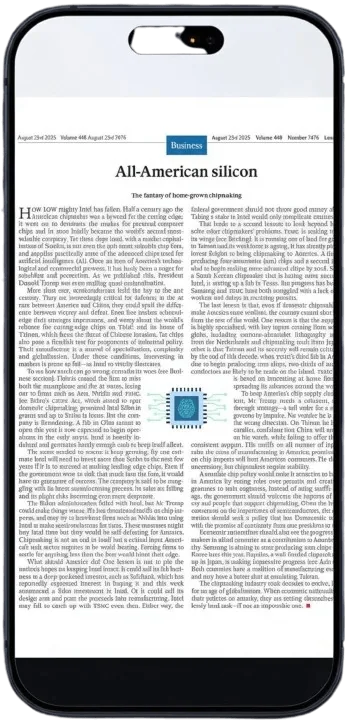
The original PDF fits the whole page into your phone viewport. The page is visible, but paragraphs, captions, and footnotes are too small to read without zooming.
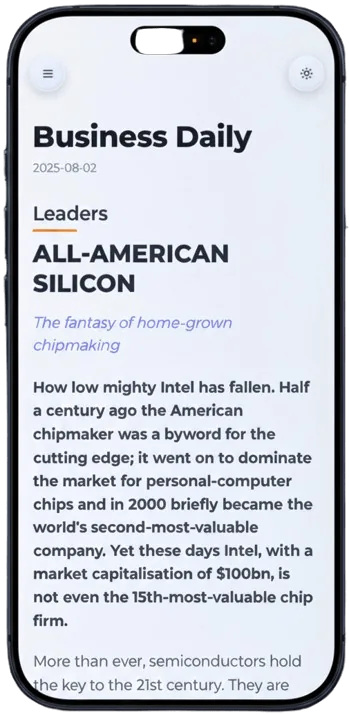
Read the document as a scrollable article instead of a fixed page.
The content adapts to the screen width.
Use the result on phone, tablet, or desktop.
Pick the document that forces you to zoom.
PDF2Mobile converts the content into responsive text.
Scroll naturally through the clean mobile-friendly version.
PDFs preserve page layout, which is good for printing but bad for narrow screens. On a phone, the page shrinks and text becomes tiny. A reflowed reading view solves the reading problem directly.
The converted version stays available in your library, so you can return to the readable view instead of reopening the original cramped PDF.
No. It creates a readable version while keeping the original PDF separate.
No. It helps on phones most, but the converted view also works on tablets and desktop browsers.
Reflow PDF pages online into readable, phone-width text. Convert fixed PDFs into mobile-friendly articles with headings, lists, OCR, and no horizontal scrolling.
Convert a PDF to a mobile-friendly reading view online. Reflow fixed pages into readable phone-width text with OCR, headings, and clean vertical scrolling.
Read PDFs on iPhone without pinching or horizontal scrolling. Convert fixed PDF pages into mobile-friendly articles that fit Safari, iCloud files, and small screens.